Sponsor Your Own Users
Scenario:
- You like Nexiwave Voicemail-to-text service
- You believe Nexiwave can greatly save your employee's time as they don't have to listen to voicemails
- You don't want to create a Nexiwave account for each employee's email address
- You want one Nexiwave account to cover all Nexiwave related costs
How?
You can easily enable Nexiwave Voicemail-to-text for your users with our "Sub-Accounts" feature. Two steps are required:
Step 1: List your users' email addresses in your Nexiwave "Sub-Accounts" page.
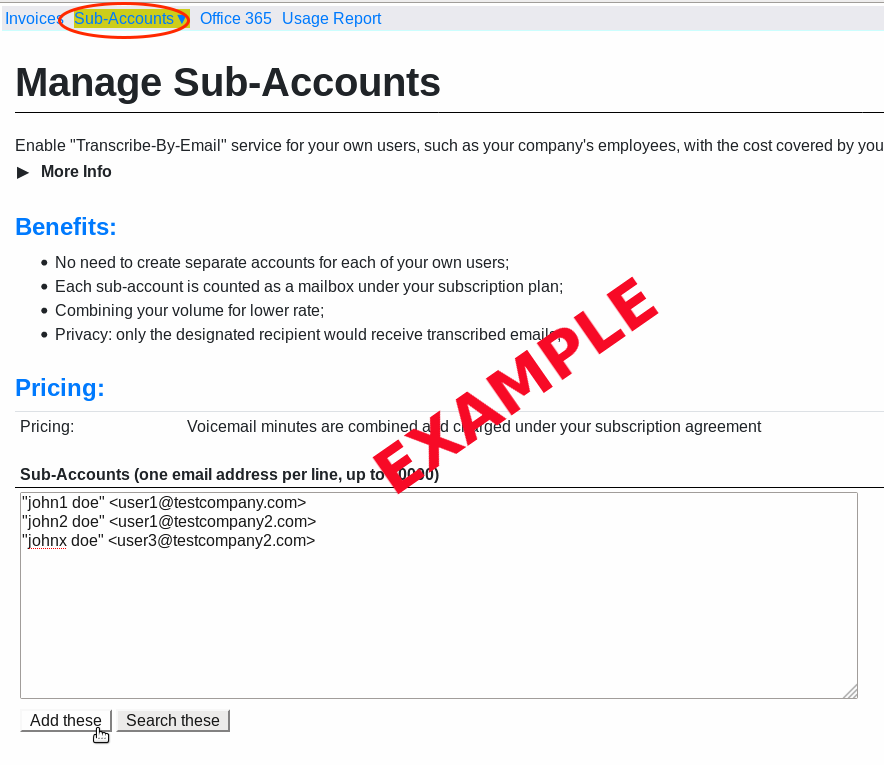
Step 2: After added, each Sub-Accounts will be provided a Nexiwave custom email address in the "Forward Voicemail Emails to" column.

Nexiwave fully automated service will:
- receive any voicemail emails sent to these Nexiwave custom email addresses;
- extract audio attachment;
- transcribe;
- send a transcribed email (with the audio attached) to the user's real email address.
Your next task would be simply to direct your users' voicemail emails to their corresponding Nexiwave custom email addresses.
How to direct my users' voicemail emails to Nexiwave?
Nexiwave offers flexible ways to work with ALL email service providers/software:
- Manually change each user's voicemail email delivery address:
If the number of users is small, you can manually change each user's vociferate email address in your phone system to their corresponding Nexiwave custom email address. Your users' Nexiwave custom email address is always listed in the "Forward voicemails to" column in your "Sub-Accounts" page
- Instructions for Microsoft 365 (Office365) emails.
- Instructions for all Exchange versions / Exchange Online (Office365) emails.
- Instructions for Google G-Suite Hosted Gmails.
- Instructions for Mitel MiCollab NuPoint
- Instructions for Mitel Application Suite (MAS) server
- Email service provided by other email provider/software:
Automatic forward function is a basic function for all business email hosting services / software. This is widely used for features like compliance, audit and many more. In general, you can add a "Routing" rule in your email service configuration to automatic forward a copy of voicemail email to our dispatch address: dispatch@nexiwave.com. In plain English, the rule is like this: when the sender is "voicemail@mycompany.com" (change to your voicemail email sender address), forward a copy to "dispatch@nexiwave.com".
Tips:
- Having your user list in Excel? You can upload Excel files directly in Sub-Accounts page.
- Having a lot Sub-Accounts, with frequent changes? Avoid the manual tasks of adding/deleting Sub-Accounts by integrating with Nexiwave Sub-Accounts API your user sign up process.